Most passengers flying from Nagpur are familiar with the sequence of steps they need to complete before entering the terminal.
Passengers queue at the terminal entrance, hand over a boarding pass and photo ID to the verification staff, wait for the personnel to complete the check, collect the documents, and enter the terminal.
The process works, but it is not particularly fast, and at peak hours the queue can be long.
DigiYatra at Dr. Babasaheb Ambedkar International Airport offers a different way for passengers to verify their identity and enter the terminal. It is a facial recognition entry system that lets registered domestic passengers walk up to a dedicated DigiYatra e-gate, look into a camera, and enter the terminal in seconds.
DigiYatra is voluntary, free to use, and available to any passenger willing to spend a few minutes registering on an app before their flight.
What Is DigiYatra?
DigiYatra is a national initiative from the Ministry of Civil Aviation. At Nagpur Airport, it gives domestic passengers a faster, free alternative to manual ID verification at the terminal entry gate.
To use it, passengers register on the DigiYatra app, verify their identity with Aadhaar, and add a selfie. Before each flight, they add their boarding pass to the app. At the airport, they walk up to the DigiYatra e-gate, where a camera checks their face against their stored ID and opens the gate if it matches.
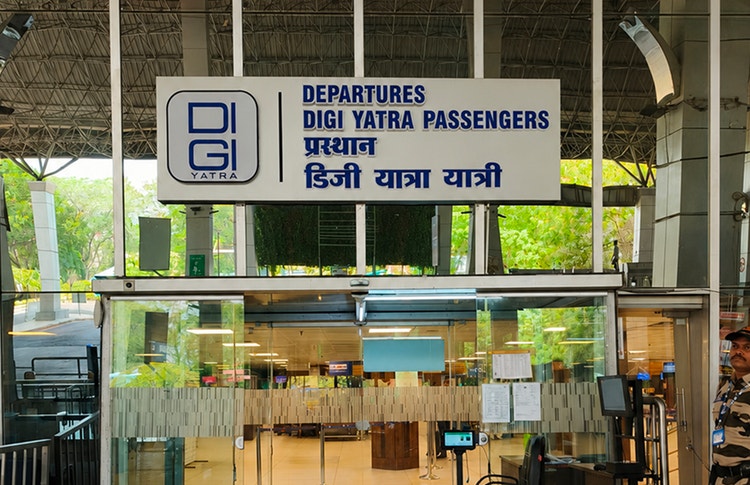
Is DigiYatra Available at Nagpur Airport?
Yes. Dr. Babasaheb Ambedkar International Airport has a dedicated DigiYatra e-gate at the terminal entry point. The e-gate is fully operational and available to all domestic passengers.
The facility was inaugurated by the Union Civil Aviation Ministry as part of the national expansion programme that began with Delhi, Bengaluru, and Varanasi in December 2022 and has since reached over 30 airports across India.
How DigiYatra Entry at Nagpur Airport Compares to Traditional Terminal Entry
DigiYatra and traditional terminal entry both get passengers through the gate, but they differ in speed, process, and what the passenger needs to have in hand.
The table below sets out the differences between entering the terminal through the DigiYatra e-gate and through the standard manual verification counter.
| DigiYatra E-Gate | Traditional Verification Counter | |
| How identity is verified | Automated facial recognition by camera | Staff member manually checks physical ID and boarding pass |
| What the passenger presents | Nothing | Government photo ID + printed or digital boarding pass |
| Queue | Dedicated DigiYatra lane | General verification queue |
| Physical contact | Fully contactless | Boarding pass and ID handed to staff and returned |
At Nagpur Airport, the DigiYatra lane runs alongside the standard verification counters, so passengers can choose either.
How to Enrol in and Use DigiYatra at Nagpur Airport
The following five steps cover the process for a passenger to enrol in the DigiYatra program via the app, and the process of entering the airport terminal via the dedicated DigiYatra e-gate at the Dr. Babasaheb Ambedkar International Airport.
- Download and Register on the DigiYatra App
The DigiYatra app, published by the DigiYatra Foundation, is available on Google Play Store and Apple App Store. To create an account, the passenger enters a mobile number and verifies it with a one-time password. The mobile number linked to Aadhaar is the recommended choice here, as it makes the identity verification in the next step faster, since both processes draw on the same registered number. Registration is free, and no fee applies at any point in the process. - Complete Aadhaar-Based Identity Verification
The app prompts the passenger to enter their Aadhaar number, and triggers an OTP to the mobile number registered with Aadhaar. The passenger can key in the OTP to complete the e-KYC verification. - Capture a Selfie for Biometric Matching
The passenger can upload a selfie to the app. The camera at the DigiYatra e-gate uses this image to facially verify the passenger. - Add Flight Details
Before a flight, the passenger can add their flight info to the app by entering their PNR number, upload a digital boarding pass, or scanning the QR code of the boarding pass. - When At Nagpur Airport, Walk Through the DigiYatra E-Gate
On arrival at the terminal, the passenger can head to the dedicated DigiYatra e-gate at the entry point. The e-gate camera captures their facial image, validates the image against the stored encrypted facial data, confirms active flight details, and opens the e-gates. From there, the passenger can proceed to the check-in area.
Is DigiYatra Safe? How Passenger Data Privacy Works
Passenger credentials stay on the passenger's own phone rather than in a central database. When flight details are added, only the information needed for that journey is sent to the departing airport.
The DigiYatra Foundation states that the airport keeps biometric data for 24 hours after departure for security purposes, then deletes it. Passengers who want the full terms can check the Foundation's privacy policy at https://digiyatrafoundation.com/privacy-policy.
Tips for a Smooth DigiYatra Experience at Nagpur Airport.
- Biometric and identity information is not stored in a central government database. Instead, the passenger's credentials remain on their own smartphone.
- When flight details are added, the app transmits only the information relevant to that specific journey to the departing airport.
- After travel, this data is purged. DigiYatra Foundation states that the departing airport retains biometric data for 24 hours post-departure for security purposes, after which it is deleted.
Note: Passengers who want to review the exact terms should consult the Foundation's current privacy policy at https://digiyatrafoundation.com/privacy-policy.
Tips for a Smooth DigiYatra Experience at Nagpur Airport
The following points can help passengers avoid the most common issues when using DigiYatra at Nagpur Airport:
- Complete registration at least 24 hours before departure. Same-day registration is possible, but Aadhaar e-KYC, selfie capture, and boarding pass upload all require a stable internet connection and a few minutes of uninterrupted attention.
- Verify that the name on Aadhaar matches the name on the flight ticket exactly. A missing middle name, a spelling variation, or a shortened first name can cause the biometric validation to flag a mismatch at the gate.
- Capture the selfie in good lighting.
- Add the boarding pass to the app well before arriving at the airport.
- Carry a government-issued photo ID. DigiYatra handles terminal entry verification, but airline staff or security check personnel at subsequent checkpoints may still request identification.
- Look for the DigiYatra signage at the terminal entrance and head to the dedicated lane. Passengers who join the general manual verification queue by habit will bypass the faster e-gate lane.
For any assistance on the day of travel, passengers can reach the airport's help and support desk or speak with staff stationed near the DigiYatra lane.
Beyond DigiYatra: How Nagpur Airport Is Improving the Passenger Experience
DigiYatra is one of several passenger-experience upgrades underway at Dr. Babasaheb Ambedkar International Airport as part of GMR Aero's terminal redevelopment programme.
The airport is doubling its self-check-in kiosks from 5 to 10, and four self-baggage drop counters are being installed as part of the terminal refurbishment. These upgrades will allow passengers to tag and drop checked luggage without queuing at a staffed counter.
Accessibility infrastructure is also being expanded. Planned upgrades for Passengers with Reduced Mobility (PRM) include a dedicated PRM help desk, priority lanes at key checkpoints, tactile paving for visually impaired passengers, and specialised PRM seating. These are designed to ensure that the faster, more automated terminal experience extends to all passengers.
Together with DigiYatra, these initiatives reflect a terminal that is being rebuilt to deliver a standard of passenger experience where the default at most touchpoints shifts from manual and staffed to digital and self-directed. Alongside, traditional staffed touchpoints continue to be present for passengers that prefer them.
Getting Started with DigiYatra at Nagpur Airport
DigiYatra at Nagpur Airport is operational, free, and open to all domestic passengers. Registration takes a few minutes, and the e-gate is ready to use at the terminal entry point of Dr. Babasaheb Ambedkar International Airport.
GMR Aero continues its phased redevelopment of Dr. Babasaheb Ambedkar International Airport to expand its capacity from the current 4 million to 30 million. DigiYatra is one of the early systems already in place to keep terminal entry fast and efficient at higher passenger volumes.
Frequently Asked Questions
Can international passengers use DigiYatra at Nagpur airport?
DigiYatra is currently available for domestic flights only at Nagpur Airport. Passengers on international routes, including services to Sharjah and Doha, should use standard manual verification at the terminal entry.
Do I still need to carry a physical ID if I use DigiYatra?
Carrying a government-issued photo ID is recommended even with DigiYatra, as airline staff or security personnel may request it at other checkpoints beyond the e-gate.
Can I register for DigiYatra on the day of my flight?
Same-day registration is possible, but completing enrolment at least 24 hours before departure is strongly recommended to avoid last-minute delays with verification or boarding pass sharing.
How is DigiYatra different from the old Aadhaar-based airport entry?
Older Aadhaar verification required manual staff checks at the counter. DigiYatra automates the process entirely through facial recognition at a dedicated e-gate.
Who manages the DigiYatra program in India?
DigiYatra is managed by the DigiYatra Foundation, a joint venture involving the Airports Authority of India and private airport operators, under the policy guidance of the Ministry of Civil Aviation.
What documents do I need for DigiYatra registration?
A valid Aadhaar number for e-KYC verification and a smartphone with the DigiYatra app installed.
Where is the DigiYatra e-gate located at Nagpur airport?
The dedicated DigiYatra e-gate is positioned at the terminal entry point, and is clearly marked with signage.
What happens if I lose or change my phone after registering for DigiYatra?
The passenger can download the DigiYatra app on the new device and complete the registration process again. DigiYatra enrolment is linked to the Aadhaar and mobile number, not to a specific device.
Can passengers wearing turbans or head coverings use DigiYatra?
Yes. The facial recognition algorithm matches identity using specific points on the face. Wearing a turban or head covering does not affect the biometric validation at the e-gate.
Do I need to have DigiLocker installed to register for DigiYatra?
DigiLocker is not mandatory. The DigiYatra app supports offline Aadhaar verification as an alternative. If a passenger does not have a DigiLocker account, one can be created directly within the DigiYatra app during registration.
Can passengers with foreign passports use DigiYatra?
DigiYatra currently supports only Aadhaar-based registration. The DigiYatra Foundation has indicated that integration with Indian and foreign passports is planned for a future phase.
Is the DigiYatra app a national app, or do I need to register separately for each airport?
The DigiYatra app is a single national application. Registration done once is valid across all DigiYatra-enabled airports in India. For each new flight, the passenger only needs to add the boarding pass details.
What should I do if my DigiYatra facial scan fails at the Nagpur airport e-gate?
If the facial scan does not match, airport staff stationed at the DigiYatra lane will direct the passenger to the standard manual verification counter. The passenger can enter the terminal through the regular process using a physical ID and boarding pass.